Better Auth, A Better Auth?
For most of my projects, I have always tried to create my custom auth since relying on auth providers like Kinde and Clerk can prove expensive especially when the project scales. Although my auth implementation with JWT and http session cookies is relatively secure, it is hard to implement the best security policy such as access authorizations and role-based access using custom auth.
At some point, I had to be honest with myself: I was spending more time reinventing authentication than building actual product features. And every time I added something new like password resets, OAuth providers, token rotation, device tracking, I felt like I was duct-taping security instead of engineering it.
That’s when I came across Better Auth. And yes, I know how that sounds — “better” is a bold claim. But after actually using it in production, I genuinely believe it lives up to the name.
The Real Problem With “Rolling Your Own” Auth
If you’ve built custom auth before, you know the cycle:
- Start with JWTs and session cookies.
- Add refresh tokens.
- Patch in role-based access control.
- Realize you forgot proper token invalidation.
- Start worrying about replay attacks, CSRF, XSS hardening.
- Eventually question your life choices.
Security isn’t just about generating tokens. It’s about lifecycle management, auditing, permissions, and edge cases you didn’t think about. That’s where most custom auth solutions quietly fall apart.
Why Not Just Use Kinde, Auth0, or Clerk?
I’ve evaluated platforms like Kinde, Auth0, and Clerk. They’re polished. They’re enterprise-ready. They also become very expensive very quickly once your user base grows or you need advanced features.
The pricing models often scale per MAU (monthly active users), which is fine until your side project stops being a side project. Suddenly auth becomes one of your biggest operational costs — not infrastructure, not compute — auth.
For indie hackers, startups, or developers building SaaS products with thin margins, that hurts.
Enter Better Auth
What surprised me most about Better Auth wasn’t just that it was free — it was how complete it felt.
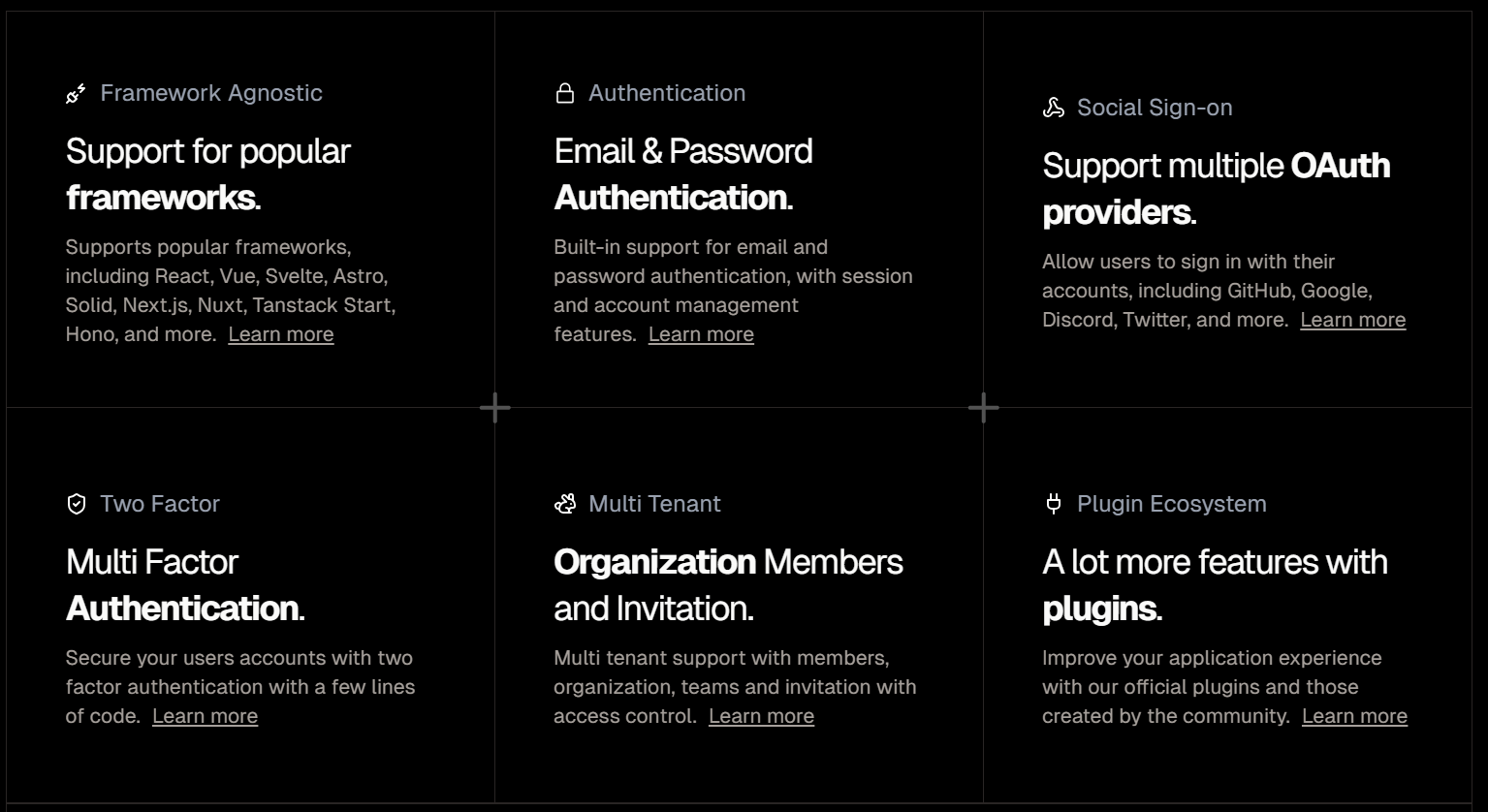
Here’s what stood out:
1. Modern Authentication Out of the Box
- Passkeys (WebAuthn-based authentication)
- API keys for service-to-service communication
- Session management
- OAuth integrations
- Role-based access control
Passkeys alone are a big deal. They eliminate passwords entirely and rely on device-bound cryptographic credentials. Implementing WebAuthn manually is not trivial. Better Auth abstracts that complexity without hiding how it works.
2. Clear Visibility Into Login Activity
One subtle but powerful feature: users can see their last used login method.
This might sound small, but it improves both UX and security transparency. If a user suddenly sees a login method they didn’t use, that’s an immediate red flag. It builds trust — and trust is everything when it comes to authentication.
3. Proper Authorization, Not Just Authentication
This is where my custom implementations always started to wobble.
Authentication answers: Who are you?
Authorization answers: What are you allowed to do?
Better Auth handles structured access policies cleanly. Instead of sprinkling role checks all over my backend, I can define roles and permissions in a consistent, maintainable way.
No more fragile middleware chains or “temporary” permission checks that live forever.
4. Secure by Default
One of my biggest fears with custom auth is subtle misconfiguration:
- Incorrect cookie flags
- Improper token expiration handling
- Weak session invalidation
- Missing CSRF protection
Better Auth ships with sensible, secure defaults. That matters more than flashy dashboards. Security should not depend on whether I remembered to set a flag correctly at 2AM.
5. Developer Experience That Doesn’t Fight You
Setup was surprisingly straightforward. Instead of wrestling with a proprietary dashboard or juggling multiple SDKs, the integration felt like adding a well-designed library — not onboarding to a billing platform.
It integrates cleanly into existing stacks. It doesn’t try to own your entire architecture. It just handles auth properly.
Cost Matters — Especially When You’re Scaling
Here’s the reality: auth providers love startups… until they grow.
What starts as a generous free tier can turn into a significant recurring cost. If authentication becomes your bottleneck financially, you’re forced to either:
- Migrate under pressure (dangerous), or
- Accept the cost and shrink your margins.
Better Auth removes that anxiety. You’re not building on a ticking pricing model.
Is It Actually “Better”?
For enterprise teams that need compliance certifications, advanced enterprise SSO contracts, or dedicated support SLAs, platforms like Auth0 still make sense.
But for developers who:
- Care about security
- Need modern auth features like passkeys
- Want proper role-based access control
- Don’t want auth to eat their revenue
- Prefer owning their stack
Better Auth feels like the sweet spot. Here is a video tutorial on how to implement better auth in your project.
Final Thoughts
I used to think building custom auth made me more independent. In reality, it just made me responsible for solving edge cases that entire teams at auth companies specialize in.
Better Auth gave me something I didn’t expect: peace of mind.
I can focus on product. I can ship features. I can scale without watching an auth bill creep up every month. And I can do all of that while still supporting modern authentication standards like passkeys and API keys.
So yes — in my experience, it actually is a better auth.